Video
How I Made This Video: Editing Videos with Muse AI
By Mony Dragon · Published 2026-11-20
Intermediate · About 20 minutes to read
video editingMuse AIffmpegvoice cloningROG Flow Z13YouTube
Video walkthrough
The video, in one line
One tablet replaced my workstation, my gaming rig, and my AI subscriptions. The video is 8 minutes and 26 seconds, it is called ROG Flow Z13 128GB: The $3,330 Tablet That Replaces $7,719 of Gear, and I made the whole thing — script, voiceover, visuals, edit, thumbnail, description, research — in one day, November 20, 2026, with Muse AI assisting. The free tier of Muse AI got the job done, and that is the point of this guide: you do not need a studio, a budget, or a paid plan to make a video like this.
The idea and the script
The idea came from the machine itself. I bought the ROG Flow Z13 (2025) with 128GB of unified memory for $3,329.98, and it replaced three things at once: a Mac Studio-class workstation, a gaming rig, and three cloud AI subscriptions at about $720 a year. Add those up and the separate setup costs about $7,719 in year one. That is a number people can feel, and it is the whole video in one sentence.
I wrote the script with Muse AI. It came out at 1,428 words, about ten minutes of narration, structured as a cold open, a specs section, then three acts — local AI, games and GTA V modding and Unity, streaming — then an honest part and a cost breakdown close. The rule for the script was the same as everything I write: my voice, my words, no polished corporate speak. Muse AI helped me shape it and check the facts, but the story is mine.
Before a word of the script went into the edit, I researched the prices. Every number in the cost breakdown is a real price from November 2026, sourced from Apple, Newegg, Best Buy, and the companies' own pricing pages: Mac Studio M5 Max 128GB at $5,099, a gaming rig in the RTX 5070 class at about $1,900, and the three AI subscriptions at about $720 a year. The video also stays honest about where the Z13 loses — ray tracing cuts the frame rate roughly in half, and it has no DLSS or CUDA. A cost comparison that hides the weak spots is an ad, not a video.
Voiceover: my own cloned voice
The narration is my own cloned voice. I recorded a short reference of myself reading, and the voice is generated from that on my own machine — Chatterbox, running locally on the ROG Flow Z13 itself, CPU-only, no cloud, no per-minute bill. Nobody else's voice, no stock narrator, and no southern drawl: I am not from the South and I did not want one in the clone.
The script is split into seven sections, and each one is generated as its own take. A take runs a few minutes on the ROG's CPU, so long generations run as Windows Scheduled Tasks in the background — SSH sessions kill background jobs, so the scheduled task is the reliable way.
Cloned voices misread things, so the generation text is spelled the way it needs to sound, not the way it reads on paper. Z13 is written out as Z thirteen, because the clone reads Z13 as Z fourteen. My name is written as mahni, one smooth word. Numbers are spelled out in words, because the clone turns 128 into 108 or 28. Workstation is written as two words, work station, and token as toe-ken. Act numbers stay as numerals — Act 3 reads clearer than Act three.
Every take gets verified before it goes in the edit. I check each one with Whisper, an open-source transcription tool, and I listen to it myself. The metrics catch clicks and buzzes — a spike check finds the isolated clicks, and the bad stretches get re-recorded or spliced from a clean generation at a sentence boundary. But the metrics do not catch everything my ears do. My ears are the real test, and no take is called clean on numbers alone.
Visuals: AI illustrations plus real screenshots
There are twelve AI-generated visuals in the video, all in one locked style: flat vector illustration, dark navy background, teal and amber accents, no readable text — the text goes on later in the edit, so it stays sharp. The style stays the same across the whole video so it feels like one video, not twelve random images.
The AI images are illustrations, and the video never presents them as real. The real stuff is real: the Task Manager Performance screenshot and the Settings About screenshot were captured on my own Z13, the Unity Editor shot is a real screenshot of Phantasy Quest: The Awakening open in Unity 7 alpha, the Z13 product photos are real sourced photos, and the broken kickstand photo is a real photo of my own machine, labeled on screen as a real photo. That honest part is the section people trust the most, and it only works because the rest of the video is honest about what is real and what is not.
- AI illustrations: cold open tablet, product shots, memory pool, coding at night, voice workflow, game editor, modding loop, game library, streaming control, split diagram, audience view, end card.
- Real screenshots: Task Manager Performance (Ryzen AI Max+ 395, 42 of 124 GB memory in use), Settings About, Unity Editor with Phantasy Quest open.
- Real photos: Z13 product photos showing the tablet opened up with the keyboard and kickstand, and my own broken kickstand.
Editing: the ffmpeg pipeline
The whole edit is ffmpeg, scripted in bash, no timeline editor. One build script takes the voice takes, the visuals, the avatar, and the screenshots, and renders the finished 1920x1080 video. Every section is built the same way, then the sections are joined into the final file. That means a fix is a partial rebuild — change one section, rebuild that section, rejoin — instead of re-rendering eight minutes from scratch.
Step 1 — Motion on still images
Every still visual gets a slow Ken Burns zoom, so nothing on screen sits dead. The product visual gets a gentle rotation sway. Small motion, the whole time, keeps the eye from drifting.
zoompan · rotate
Step 2 — Lip-synced avatar
My blue dragon avatar sits bottom-right through the whole video. The base avatar is always on, and the talking version overlays only while the voice is actually speaking — a small script reads the voice audio, finds the speech segments, and switches the mouth open and closed to match.
RMS speech detection · 50 ms windows
Step 3 — Rotation loop with callouts
The Z13 section opens with a short loop of real product photos, each one fading into the next, with callouts burned in: opened up with tablet, keyboard, and kickstand; the I/O — 2x USB4, HDMI 2.1, microSD, Wi-Fi 7; and the 13.4 inch 2.5K 180Hz touch display.
xfade · drawtext callouts
Step 4 — Real screenshots in the specs section
The Task Manager and Settings screenshots go in as full-screen cards with a blurred backdrop, so the numbers are readable on a phone. The processor card gets its own clean crop.
scale + pad · blurred background
Step 5 — Cost chart
The close gets a bar chart built as an image: Mac Studio $5,099, gaming rig $1,900, cloud AI subs $720 a year, total $7,719 in amber, Z13 $3,329.98 in green, and you save about $4,389 in year one.
PIL chart · real prices, Nov 2026
Step 6 — Text that stays clear of the avatar
The on-screen text is big and centered in the space left of the avatar, and the avatar never gets covered. The first version let the longest lines run under the avatar, so the text sizes and positions were measured and moved — text is 60 and 52 point, centered in the region left of the avatar.
measured with PIL · avatar occupies x 1560–1880
Step 7 — QR codes on the end card
The end card has QR codes for monydragon.com and patreon.com/Monydragon, with the link text under each one, plus a line pointing to the Twitch and Kick streams, Wednesdays and Fridays, 5–7 PM Central.
200x200 QR · labels centered underneath
Step 8 — Thumbnail
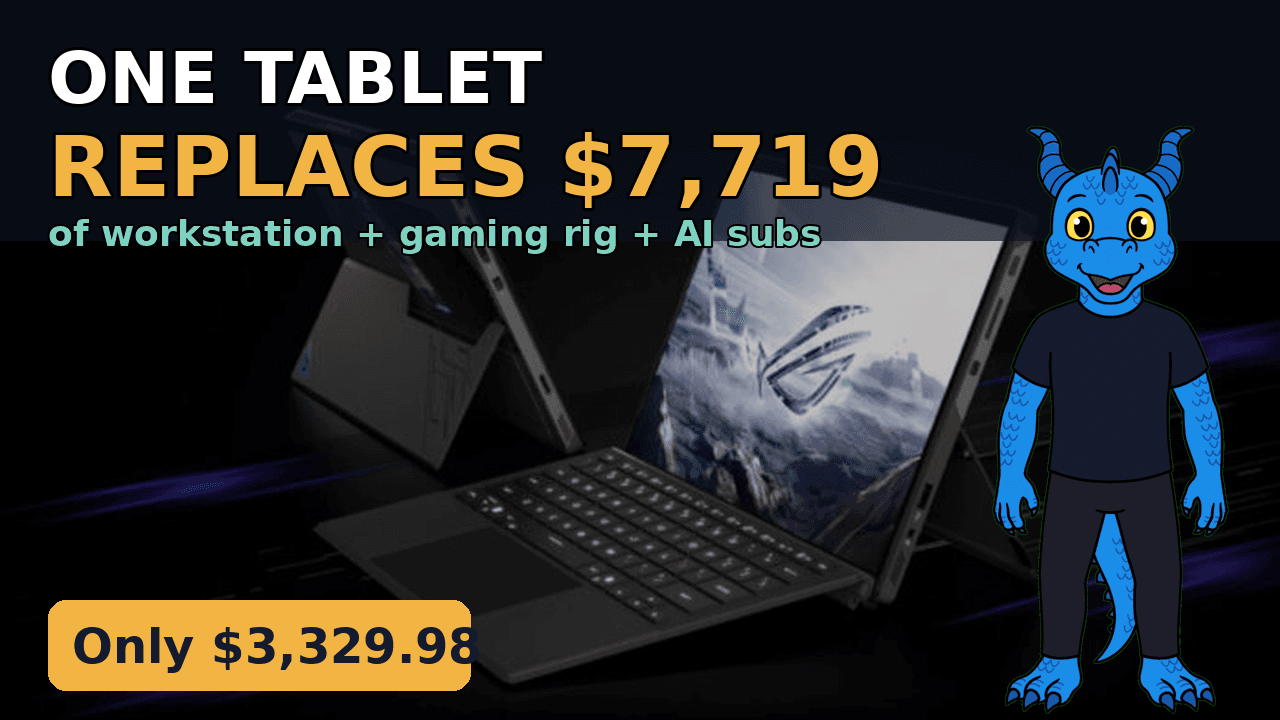
The thumbnail is a real Z13 photo, darkened, with big text: ONE TABLET REPLACES $7,719, and an amber tag that says Only $3,329.98, with the dragon avatar on the right. It has to read at phone size, so the words are few and huge.
1280x720 · real photo + avatar
Three versions got rendered before the final one. Draft 1 proved the pipeline. Version 2 added the bigger centered text, the real screenshots, the kiosk rotation, and the lip-synced avatar. Version 3 added the right-and-center title card, the rotation loop, the real Unity screenshot, more sourced photos, and the cost chart. Version 3.1 was the partial edit — text moved clear of the avatar, QR codes added, thumbnail built. Keeping every version meant nothing was ever lost, and the final file is the one that went up.
Publishing: the launch pack
Before upload I wrote a launch pack: the title, the full description, the tags, the chapters, and the plan for every other platform. The title leads with the exact product name people search, then the money hook: ROG Flow Z13 128GB: The $3,330 Tablet That Replaces $7,719 of Gear. The description opens with the hook and the GTA VI angle — GTA VI launched November 19 with no PC version announced, and this is the machine to get ready on — then the chapters, the cost breakdown with sources, my story, the Phantasy Quest pitch, and every link, with monydragon.com as the hub.
- Chapters: 0:00 one tablet replaces $7,719 of gear, 0:44 what it is, 1:50 Act 1 local AI, 3:42 Act 2 games and GTA V modding and Unity, 5:14 Act 3 streaming, 6:39 the honest part, 7:35 the cost breakdown.
- Tags: ROG Flow Z13 first, then the product name, the chip, local AI, GTA V and GTA VI, and the use cases. Twenty tags, first one the exact keyword.
- Category Science & Technology, language English, not made for kids, custom thumbnail, end screen to the Time Chronicles trailer, and a card at 3:42 to the GTA V modding guide.
- The file was renamed before upload to rog-flow-z13-128gb-replaces-7719-of-gear.mp4, because YouTube reads the file name.
- A 60-second cut for TikTok, Reels, and X: the cold-open hook, the rotation loop, the cost chart, and the end card with the QR codes.
The video went up on YouTube on Friday, November 20, 2026, scheduled for 11:00 AM Central — Friday, late morning, is the prime window for gaming long-form. Same-day uploads are the plan from here on: one video a day, starting with this one.
Try Muse AI yourself
This whole video was assisted by Muse AI — script, voiceover, visuals, edit, thumbnail, research, all of it, in one day. The free tier gets the job done just as well, and that is not a line I am paid to say. It is what I used.
What was AI and what was real
Saying this plainly matters, because YouTube now labels undisclosed photorealistic AI, and because people can tell when they are being sold something. Here is the whole video, split out:
| Part of the video | How it was made |
|---|---|
| Script | Written by me, shaped and fact-checked with Muse AI |
| Voiceover | My own cloned voice, generated locally with Chatterbox |
| Illustrations | AI-generated, flat vector style, never presented as real |
| Screenshots | Real — Task Manager, Settings, Unity Editor, captured on my machines |
| Product photos | Real sourced Z13 photos |
| Kickstand photo | Real photo of my own broken kickstand, labeled on screen |
| Cost chart | Real prices from November 2026, sourced, drawn as a chart |
| Edit and thumbnail | ffmpeg pipeline and a built thumbnail, assembled with Muse AI assisting |
The tools did the heavy lifting. The decisions — what the video is about, what is true, what is honest, what stays in — were mine. That is the split that works: AI does the work, I do the judgment.
ROG Flow Z13 128GB: The $3,330 Tablet That Replaces $7,719 of Gear
The newest video is always featured.
The guide the video links to at 3:42.
My free history timeline card game.